
How to Reroll and Store Races in Multiversal Piece
Get Race Rerolls, visit the station on Solo Island, and save the races you want to use again.
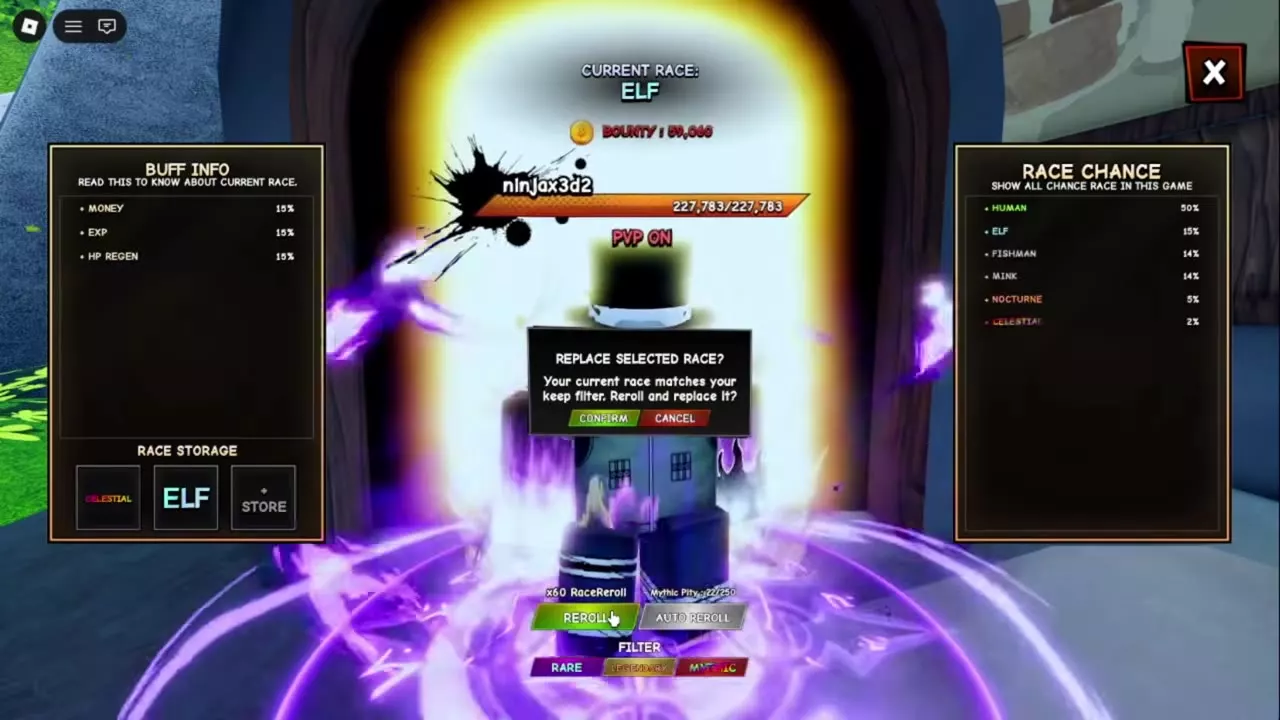
Travel to Solo Island and open the Race Reroll Station. Each manual roll uses one Race Reroll. Enable the rarity filters to receive a replacement confirmation, and use an empty Race Storage slot to save a race before rolling again. Withdraw a stored race to swap it with your active race.
Find Race Reroll and Get Roll Items
Solo Island is open at every level. Use a Teleporter’s OpenMap interaction, select Solo Island, and travel there. From the arrival point, head right toward the green area, approach the Race Reroll Station, and press E at OpenRaceRandom. You can also select Track next to Race Reroll in the Solo Island section of Guide Tracker.
Bring at least one Race Reroll. Each completed manual roll consumes one item. You can search for race in Inventory to find it; the item can be named RaceReroll there.
Ways to get Race Rerolls
- Items Shop: On Starter Island, press E at the Item Shop NPC, open Gem Shop, and select Race Reroll. One costs 250 Gems. Check the quantity and total before confirming; if it is out of stock, use the shop’s refresh timer.
- Bandits: Defeat ordinary Bandits in the fenced Starter Island camp for a chance to receive one while leveling.
- Chests: Epic and Legendary Chests can contain Race Rerolls. When stocked, Epic Chests cost 120,000 Yen and Legendary Chests cost 300,000 Yen. The Index also awards Epic Chests at 25 and 50 discoveries and a Legendary Chest at 75 discoveries.
- Sorcerers vs Curses: At Level 1,600, participate in the event and earn Faction Points from missions or Curse Outbreak waves. Its World Shop sells Race Rerolls for 200 FP each, with a stock limit of five that refreshes hourly.
- Permanent Item Gacha: A pull costs 1 Stellarite. The Foxfire pool with Foxfire Set and the Jackpot pool with Jackpot Jacket each list a 15% Race Reroll chance per pull. Jackpot Return featuring Hakari and Ninefold Return each list 25.45% per pull. Select Collect on the results screen.
Filter Races and Confirm Rerolls
- In Filter, select the rarities you want to protect: Rare, Legendary, or Mythic. A colored button is on; a gray button is off.
- Select Reroll. The new race becomes active, and its bonuses appear under Buff Info.
- When the active race matches an enabled filter, another roll brings up Replace Selected Race? Choose Cancel to keep it equipped or Confirm to replace it.
The panel also has an Auto Reroll button and a Mythic Pity counter with a 250-roll target. In Settings, enable Instant Reroll Results to skip the result animation; the cost, odds, and server cooldown stay the same.
Store, Withdraw, or Swap a Race
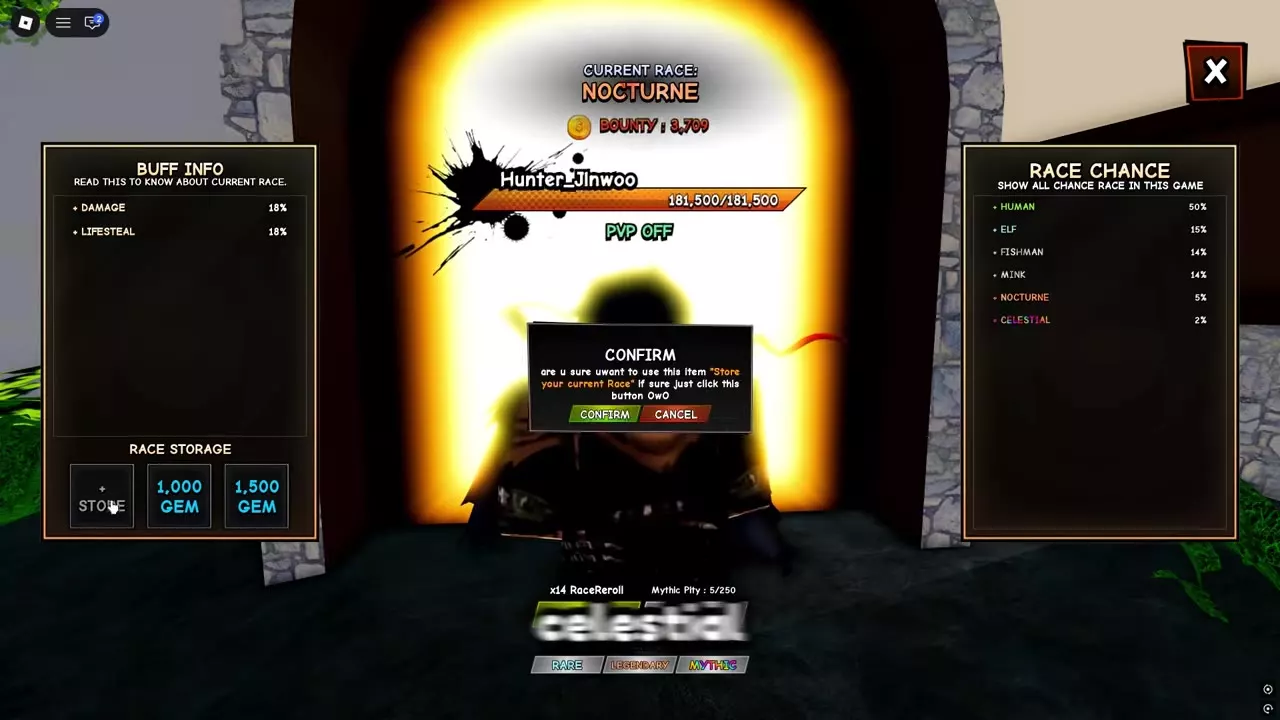
To keep your current race while rolling for another, select Store in an empty slot under Race Storage and confirm. The storage panel also displays slots priced at 1,000 Gems and 1,500 Gems.
To switch at the station, select a stored race and confirm Withdraw. The stored race becomes active, and the race you were using takes its place in that slot. For example, withdrawing Elf while Nocturne is active equips Elf and moves Nocturne into Elf’s former slot.
You can also open Inventory → Storage → Races, select Unstore on the race you want, and confirm.
Race Buffs and Reroll Sources
- Compare every race’s bonuses and roll chance in the races guide.
- Browse currencies and stock in the shops guide.
- Compare Stellarite pools in the Permanent Item Gacha guide.
- Find and open more chests and material boxes.
- Follow the full FP route in Sorcerers vs Curses.