
Multiversal Piece Islands and Teleport Map
Choose a Multiversal Piece island by quest level or activity, then use the Teleporter to get there and set a convenient spawn point.
Open the Teleporter's map and select an island. Solo, Arena, and Cave are marked Travel All Levels. After arriving, use the local Set Spawn interaction and check the island name in the confirmation.
Island Levels and Activities
Use the directory to compare starting quest levels, travel access, and activities. Quest Lv. identifies a quest tier; Travel All Levels marks Solo, Arena, and Cave as destinations for players of any level. Individual quests and facilities have their own requirements.
Shinjuku is a Guide Tracker category for the Gojo V2 and Sukuna V2 / Meguna story quests. Select it in the tracker to find those entries.
Browse islands by quest level, travel access and activity.
9 objects
|
|
1 level | — | Bandit quests and starter services |
|---|---|---|---|
|
The starting island has Bandit quests, training facilities, merchants, and several equipment and progression services.
TipsLook for the yellow Teleporter circle beside the tree in the town’s Safe Zone. Use Fruit Roll and Set Spawn as nearby landmarks. |
|||
|
|
150 levels | — | Monkey quests, Nightfall, and gardening |
|
A jungle quest island with Monkeys, Nightfall, and access to gardening through the Garden Keeper.
TipsSet Spawn by the arrival area if you are repeating Monkey Quest and Nightfall. The Teleporter is nearby. |
|||
|
|
450 levels | — | Desert Bandit and Sand Users quests |
|
A desert quest island with separate Desert Bandit and Sand User quest tiers.
TipsStart with Desert Bandit Quest at level 450. At level 650, look for the Sand User quest contact in the sandy area. |
|||
|
|
900 levels | — | Haki, Skypians, and Kingswake |
|
An island above the clouds with Skypian quests, Haki training, and separate Kingswake purchase and summon entrances.
TipsTrack Kingswake Seller for the sword or Kingswake Summon for the boss. Both are near the large bell. |
|||
|
|
1,300 levels | — | Sorcerer quests and street bosses |
|
A city quest island with Sorcerer districts, ability sellers, and boss encounters in its streets.
TipsUse the Teleporter and Set Spawn as landmarks when returning from the boss streets. Follow the Shibuya leveling route to match your quest to your level. |
|||
|
|
— | All levels | Dungeons, rerolls, and summons |
|
A destination for dungeons, player rerolls, and Shade Fangs and Mirage encounters and sellers.
TipsHead right from arrival for the three reroll stations. Find the Dungeon entrance and Dungeon Shop beside the blue building. |
|||
|
|
— | All levels | Boss summons and gear sellers |
|
An arena for summoning and fighting bosses, with separate sellers for several weapons and fighting styles.
TipsTrack Arena Summon to fight a boss. Track Wolfshot Seller to reach the stone columns above the waterfall for the weapon purchase. |
|||
|
|
— | All levels | Mining and ore gathering |
|
A mining island with rock and ore deposits in a cave area.
TipsWalk from the Safe Zone toward the colored crystals to find deposits with the Mine Rock interaction. |
|||
|
|
— | — | Story quest navigation |
|
This Guide Tracker category lists the Gojo V2 and Sukuna V2 / Meguna story quests.
TipsSelect Shinjuku in Guide Tracker to track Gojo V2 Quest or Sukuna V2 / Meguna Quest. |
|||
Teleport, Set Spawn, and Find a Safe Zone
Teleport to an island
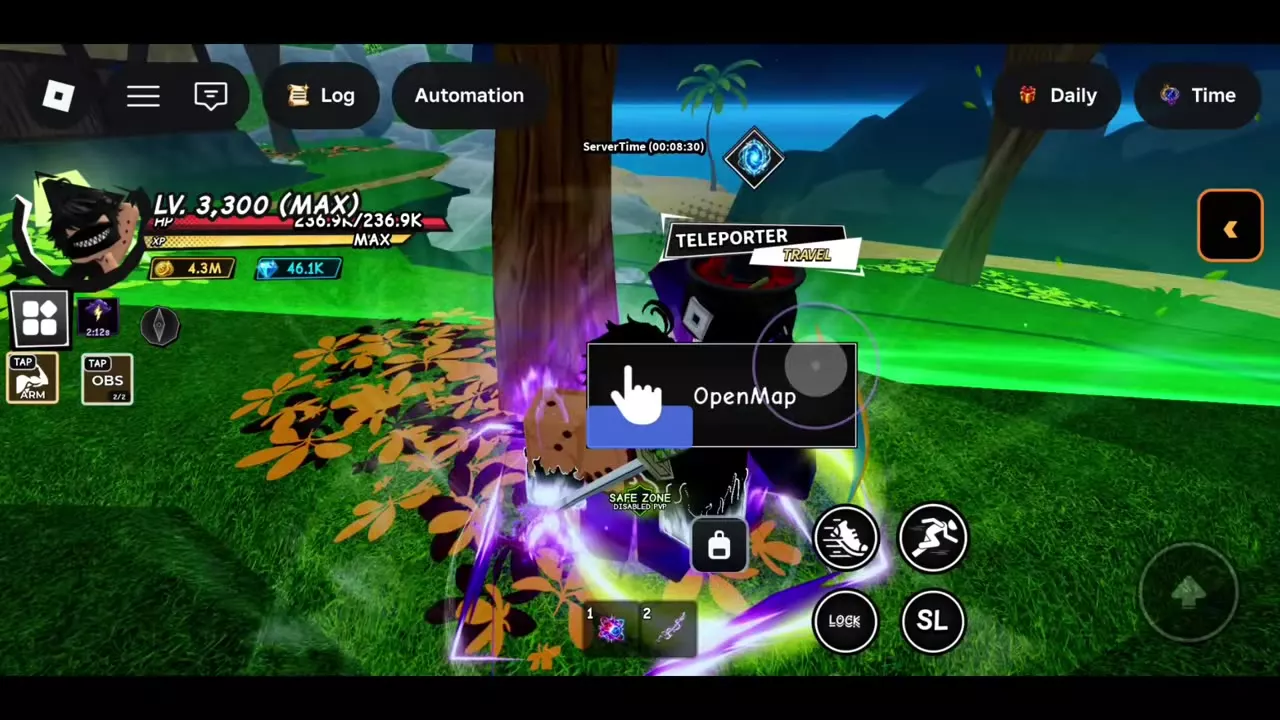
- Find a Teleporter in or near a safe area. On Starter Island, look for the yellow circle beside the tree in town.
- Approach until the OpenMap prompt appears. On PC, press E.
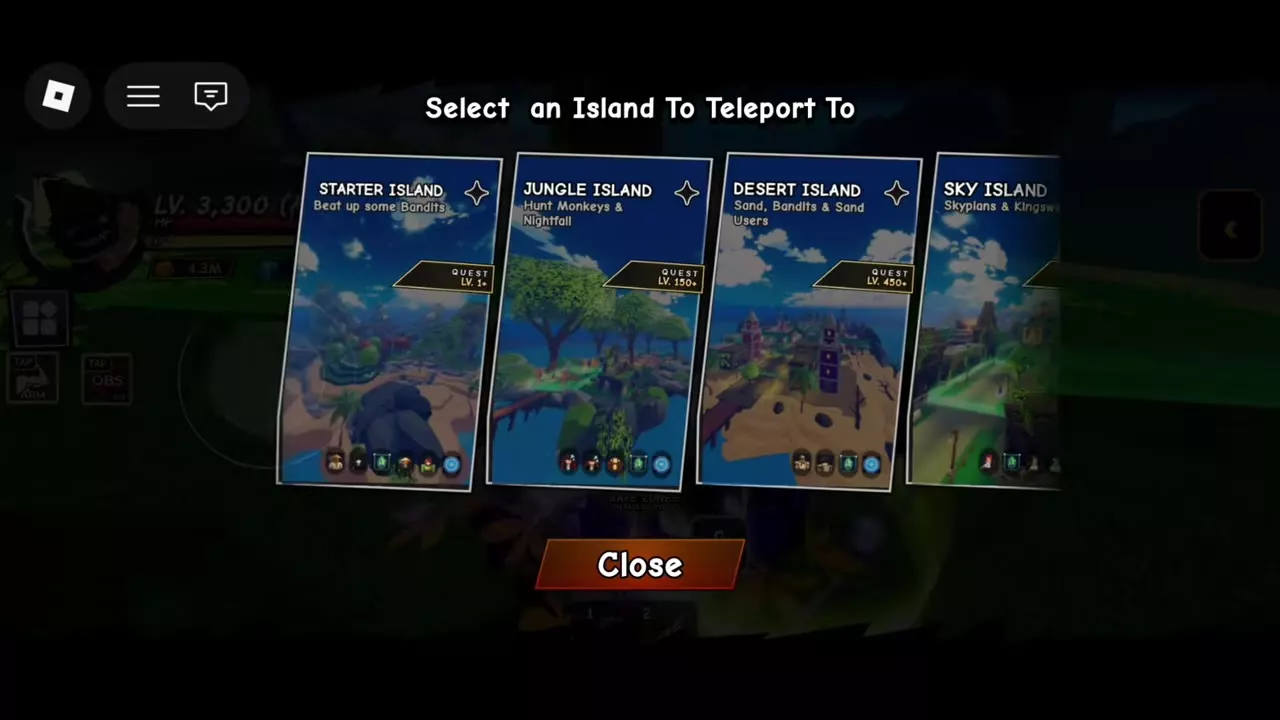
- Scroll sideways through the destination cards and select an island. Wait for it to load and check the destination name on arrival.
Select Close to leave the map without traveling. Use another Teleporter when you want to continue or return.
Set your spawn point
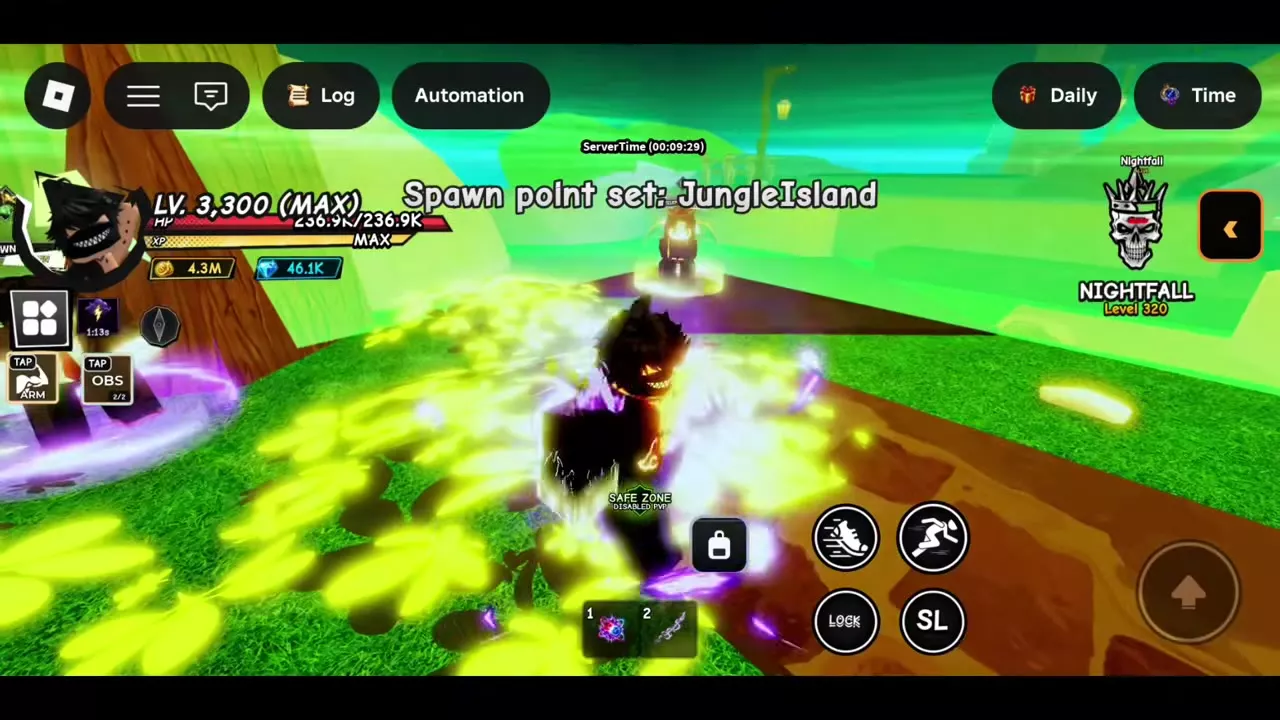
Travel to the island where you want to respawn, find its Set Spawn station, and use the SetSpawn prompt. On PC, press E. Check the confirmation for the island name.
- Starter: Find Set Spawn near Fruit Roll and the safe area. The confirmation reads “Spawn point set: StarterIsland.”
- Jungle: Find it near the arrival point and Teleporter. The confirmation reads “Spawn point set: JungleIsland.”
- Solo: Find it near the arrival point and Teleporter. The confirmation reads “Spawn point set: SoloIsland.”
- Desert and Shibuya: Look inside Desert's safe zone or near Shibuya's arrival point.
Recognize a safe zone
Cross the green boundary and look for Safe Zone and Disabled PvP on the HUD. PvP is disabled inside that area.
On Starter and Jungle, use the nearby Teleporter and Set Spawn as landmarks. Desert's safe area contains both facilities; Sky's arrival area is safe. On Solo, head right from arrival toward the green area with the reroll stations. On Cave, the safe area is on the approach to the mine. In Shibuya, use the Teleporter area as a landmark when returning from the boss streets.
Find an NPC or Choose a Quest
After arriving, use the NPC locations and Guide Tracker guide to find sellers, trainers, and activity entrances. For leveling, compare the island quests by level or follow the leveling guide for when to stay or move on. At Level 2,800, explore the story quests for the Gojo and Meguna paths.